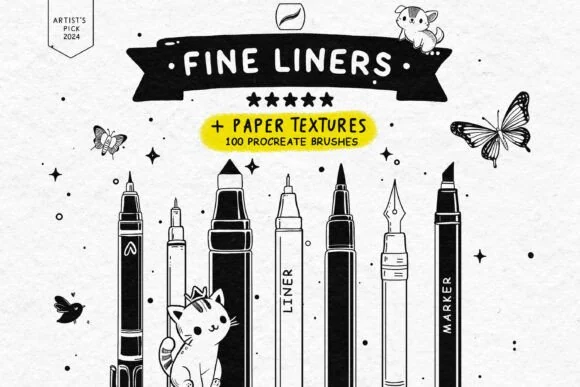
The best Procreate brushes for beginners are not the ones with the biggest number on the cover. They are the brushes you can identify, practise with, and return to without scrolling through dozens of near-duplicates. A small starter library makes it easier to learn pressure, edges, colour, and texture before you spend money on specialist packs.
This guide gives you a practical order: start with a few focused tools, build one small drawing, then add a brush only when you can name the problem it solves. The product details below come from the current DigiKitPro product catalogue; prices and availability can change, so check the linked product page before downloading or buying.
What a beginner actually needs
You can learn the fundamentals with five roles rather than five hundred brushes:
- A sketch brush for construction lines and loose studies.
- A controlled liner for outlines, hatching, and pressure practice.
- A simple painting brush for blocking large shapes and flat colour.
- A blender or smudge tool for testing soft transitions without losing your drawing.
- One texture brush for learning how grain changes an edge or surface.
The brush is only one part of the result. Procreate’s official Brush Library documentation explains how imported brushes and sets are organised; the fundamentals still come from observation, shape design, and finishing small pieces.
A low-risk starting order
1. Begin with a focused free liner set
The Free Fine Liner Set is a sensible first stop if your goal is drawing confidence. The catalogue lists 100 brushes and 13 paper textures. You do not need to use all of them: choose one pencil-like brush, one fine liner, and one textured option, then keep the rest out of your way while you practise.
Try three short exercises:
- Draw ten straight lines using different pressure from start to finish.
- Fill a page with ellipses, boxes, and contour lines.
- Sketch one object, keeping the construction layer visible beneath the final lines.
2. Add a forgiving texture medium
The Chalkboard Artist’s Toolkit is listed as a free set with 20-plus chalk brushes. Chalk is useful for practising broad marks, broken edges, lettering, and the habit of erasing back into a shape. Work on a large silhouette, soften one side, and carve the light back with the eraser. That simple loop teaches more about edge control than endlessly adjusting brush settings.
3. Use a limited colour starting point
Brush choice cannot fix a palette that is doing too many jobs at once. The Ultimate Procreate Color Vault is listed with 1,200-plus swatches in 40 palettes. Pick one palette for a study and limit yourself to a light, mid-tone, shadow, accent, and background colour. A constraint makes colour relationships easier to see.
4. Follow a sequence instead of collecting tools
If you are learning portraits, the free Procreate Portrait Starter Guide is a more useful next step than another random brush pack. It is a PDF guide with a four-phase structure: structure, value, surface, and finish. That sequence helps you understand when a brush belongs in a workflow.
When should you buy a paid brush set?
Upgrade when a repeated limitation is slowing down work you already enjoy. For example:
| If you keep drawing… | Look for… | A relevant DigiKitPro starting point |
|---|---|---|
| Faces and head studies | Sketch, blend, hair, skin, and detail tools | Portrait Mastery Kit |
| Clean illustration or manga lines | Pressure-sensitive liners and textured pencils | Essential Line Art & Sketch Kit |
| Several different subjects | A broad but organised studio kit | Artista Studio Kit |
| Traditional-looking studies | Grain, charcoal, pencil, or wash tools | Professional Charcoal Studio |
These are recommendations by workflow, not a claim that one pack is right for every artist. Read the included files and requirements on the product page before purchase.
Three beginner habits that matter more than a brush pack
Finish small work
A 20-minute study teaches more than an abandoned large canvas. Use a small subject, save the finished version, and write one sentence about what to practise next.
Name the problem before changing tools
“Looks flat” could mean weak values, not a missing brush. “Looks messy” could mean unclear construction, not a bad liner. Diagnose first; change tools second.
Keep a working set
Create a personal set with the five brushes you reach for most often. Archive experiments instead of deleting them, but do not let the library become your studio floor.
FAQ
How many Procreate brushes does a beginner need?
A sketch brush, one or two liners, a basic painting brush, a blender, and one texture brush are enough to learn the core exercises in this guide. Add specialist brushes after you can explain what they will change.
Are free Procreate brushes useful for learning?
Yes, when they are used as focused practice tools rather than a reason to collect. DigiKitPro’s free liner, chalk, colour, and starter-guide resources are useful entry points; confirm the current download details on each product page.
Do DigiKitPro brush sets work on iPad?
The brush products listed here are described in the catalogue as Procreate brush files for iPad. Procreate’s official help lists `.brush`, `.brushset`, and `.brushlibrary` as supported brush formats. Check the individual DigiKitPro requirements before purchase.
Can beginners use Procreate brushes for commercial artwork?
DigiKitPro’s Terms of Service say that, unless a product page states otherwise, purchases include a licence for personal and commercial artwork. The same terms prohibit reselling, redistributing, copying, or sharing the source files. Read the terms and the product page before taking client work.
What should I practise first in Procreate?
Start with line control, simple forms, value grouping, and edges. A short study of a cup, leaf, or portrait landmark gives you clearer feedback than testing every brush in the library.
Sources and update note
- Procreate Help: Brush Library — official import and organisation guidance.
- DigiKitPro Terms of Service — current licence and digital-product limitations.
- DigiKitPro product pages linked above — current included items and requirements at the time of update.
Start with one free, focused resource, finish a few small drawings, and let your next brush purchase solve a real workflow problem. That is a better foundation than a crowded library.